
Screenshots
App details
- Updated
- August 30, 2024
- Requires
- Chrome
- License
- Full
- Developer
- Brthrs Agency
- Category
- Web Apps
SoftPas in:
This product is also available in the following languages:
About Accessibility Desk
Download Accessibility Desk – AI Accessibility Toolkit for Inclusive Content
What Is Accessibility Desk and Why It Matters
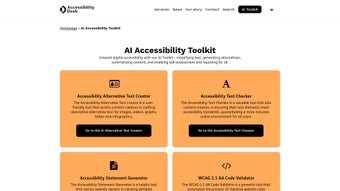
Accessibility Desk is a comprehensive AI‑driven toolkit that empowers creators, developers, and website owners to produce digital experiences that are truly inclusive. In a world where accessibility regulations such as WCAG 2.2 and Section 508 are becoming mandatory, this software offers a single, secure platform to audit, improve, and certify content across a wide range of media. Whether you are drafting blog posts, designing e‑learning modules, or publishing e‑commerce product pages, Accessibility Desk simplifies the process by providing automated text simplification, alternative‑text generation, content summarization, and self‑assessment reporting. Its intuitive interface reduces the learning curve for non‑technical users while still offering depth for accessibility professionals. By integrating the Accessibility Alternative Text Creator and the Accessibility Text Checker, the toolkit ensures that images, videos, and interactive elements receive meaningful descriptions that screen readers can interpret accurately. The built‑in Accessibility Statement Generator further helps organizations articulate their commitment to inclusivity, a critical component for legal compliance and brand trust. In short, Accessibility Desk is not just another plug‑in; it is a proactive partner that turns accessibility from a checklist item into a seamless part of the content creation workflow.
Beyond compliance, the platform drives real business value. Studies consistently show that accessible websites retain visitors longer, improve conversion rates, and enhance SEO performance because search engines can crawl well‑structured, descriptive content more effectively. For enterprises, the ability to generate audit reports automatically reduces the need for costly third‑party consultants and accelerates time‑to‑market for new digital products. For educators and nonprofit organizations, the free tier removes financial barriers, allowing smaller teams to meet accessibility standards without compromising on quality. Accessibility Desk also supports corporate social responsibility initiatives by providing measurable data that can be reported to stakeholders, reinforcing a company’s commitment to diversity and inclusion. By embedding accessibility early in the design process, teams avoid retro‑fit expenses and future legal risks, making the tool an essential investment for any forward‑thinking organization.
Key Features That Set Accessibility Desk Apart
- AI‑Powered Alternative Text Creator – Generates descriptive alt‑text for images, graphics, and video frames in seconds.
- Accessibility Text Checker – Scans headings, link text, and form labels for WCAG compliance.
- Content Simplification Engine – Rewrites complex sentences into plain‑language equivalents without losing meaning.
- Automatic Summarization – Produces concise summaries for long articles, improving readability for cognitive impairments.
- Self‑Assessment Reporting – Generates detailed audit reports with actionable recommendations.
- Accessibility Statement Generator – Crafts legally sound statements that reflect your organization’s accessibility policy.
- Multi‑Language Support – Handles English, Spanish, French, German, and more, expanding global reach.
- Secure Cloud Sync – Saves project data encrypted, enabling team collaboration across devices.
Each feature is built on state‑of‑the‑art natural language processing models that have been fine‑tuned on accessibility‑specific corpora. The Alternative Text Creator, for example, not only identifies the primary visual elements but also contextualizes them based on surrounding content, producing alt‑text that conveys purpose and function. The Text Checker runs a dual‑pass algorithm: first it verifies structural markup (proper use of ARIA roles), then it evaluates lexical choices for clarity and contrast. The Summarization tool leverages transformer‑based models to maintain key concepts while reducing length by up to 60 %. Together, these tools eliminate the repetitive manual work that often stalls accessibility projects, allowing teams to focus on creative and strategic tasks. Moreover, the self‑assessment reports are exportable in PDF, CSV, or JSON, making it easy to integrate findings into existing project management systems.
In addition to the core capabilities, Accessibility Desk includes a set of productivity enhancers. The bulk‑processing mode lets power users scan entire folders of assets with a single click, while the customizable rule engine permits organizations to enforce internal style guides alongside official standards. An activity log tracks every suggestion accepted, edited, or dismissed, providing a transparent audit trail for compliance auditors. Finally, the platform’s API exposes key functions—such as alt‑text generation and readability scoring—to developers who wish to embed accessibility checks directly into CI/CD pipelines, ensuring that new code releases are automatically evaluated before deployment.
Installation, Daily Use, and System Compatibility
Getting started with Accessibility Desk is intentionally straightforward. After you download the installer from the official website, launch the .exe (Windows) or .dmg (macOS) file. The guided wizard walks you through the standard steps: accept the license agreement, choose an installation folder, and optionally enable automatic updates. For mobile professionals, a lightweight companion app is available on Android 12+ and iOS 13+, which syncs with the desktop client via a secure API key. Once installed, the first launch prompts you to create a free account; this account is required for cloud sync and for accessing the AI models that run on remote servers, ensuring that your local device remains responsive even when processing large media files.
Daily usage follows a logical workflow. Begin by importing the content you wish to audit—whether a web page URL, a PDF document, or a folder of image assets. The dashboard then presents a real‑time accessibility score, highlighting the most critical issues. Clicking on any flagged element opens a context‑aware pane where you can accept the AI‑generated suggestion, edit it manually, or dismiss it if it’s not applicable. The Self‑Assessment module allows you to schedule recurring scans, which is especially useful for dynamic sites that frequently add new content. Export options let you share reports with stakeholders, and the Statement Generator can be launched directly from the toolbar to produce a polished accessibility statement in minutes.
Accessibility Desk is compatible with Windows 10, Windows 11, macOS Big Sur and later, as well as Android and iOS devices. The desktop version requires at least 4 GB of RAM and 200 MB of free disk space, while the mobile app runs comfortably on devices with 2 GB of RAM. Because the heavy AI lifting occurs in the cloud, even lower‑end machines experience smooth performance. Regular updates are delivered automatically, ensuring you always have the latest accessibility standards baked into the toolkit.
For organizations with strict IT policies, a silent‑install package is available, allowing administrators to deploy the software across multiple workstations via group policy or endpoint management tools. The installer also supports custom configuration files where you can pre‑define default languages, preferred reporting formats, and security settings such as forced two‑factor authentication. If you prefer an on‑premise deployment, the enterprise edition offers a self‑hosted option with dedicated GPU resources, giving you full control over data residency while still leveraging the same AI models.
Pros, Cons, Frequently Asked Questions, and Final Verdict
Pros
- AI‑driven automation dramatically reduces manual effort.
- All‑in‑one solution: alt‑text, text checking, summarization, and reporting.
- Cross‑platform support (Windows, macOS, Android, iOS).
- Secure cloud sync enables seamless team collaboration.
- Free tier available with generous usage limits.
- Bulk processing and API access for power users.
- Regular updates keep the tool aligned with evolving standards.
Cons
- Reliance on internet connection for AI processing.
- Advanced features (bulk processing, custom AI models) locked behind paid plans.
- Learning curve for non‑technical users unfamiliar with accessibility terminology.
- On‑premise enterprise option requires additional licensing.
Frequently Asked Questions
Is Accessibility Desk really free to use?
Yes, the core features—including the Alternative Text Creator, Text Checker, and Statement Generator—are available for free with unlimited projects. Premium plans add bulk processing, custom model training, and priority support.
Can I use Accessibility Desk to audit an entire website?
Absolutely. By entering the site’s root URL, the tool crawls each page, checks media elements, and compiles a comprehensive accessibility report that can be exported for compliance documentation.
How secure is my data during cloud sync?
All data transferred between your device and Accessibility Desk’s servers is encrypted with TLS 1.3. At rest, files are stored using AES‑256 encryption, and you can enable two‑factor authentication for added protection.
Does the tool support non‑English languages?
Yes, the AI models have been trained on multilingual datasets. Currently supported languages include English, Spanish, French, German, Italian, and Portuguese, with more on the roadmap.
What kind of support is available for paid users?
Premium subscribers receive priority email support, live chat during business hours, and access to a dedicated knowledge base with video tutorials and best‑practice guides.
Final Verdict and Call to Action
Accessibility Desk delivers on its promise of making digital inclusion both practical and scalable. By harnessing AI, it transforms what used to be a time‑consuming compliance exercise into an intuitive, automated workflow. The free tier is generous enough for freelancers and small businesses, while the paid plans provide the depth required by large enterprises. If you’re looking to future‑proof your digital assets, reduce legal risk, and demonstrate a genuine commitment to accessibility, downloading Accessibility Desk today is a smart move. Click the button below to start your free download, set up an account, and begin creating content that everyone can enjoy.
Accessibility Desk impresses with its robust AI features and seamless cross‑platform experience. While the reliance on internet connectivity can be a drawback in low‑bandwidth environments, the overall value—especially for organizations aiming for WCAG 2.2 compliance—far outweighs the minor limitations.
Guides & Tutorials
How to install Accessibility Desk
- Click the Download button above.
- Once redirected, accept the terms and click Install.
- Wait for the Accessibility Desk download to finish on your device.
How to use Accessibility Desk
This software is primarily used for its core features described above. Open the app after installation to explore its capabilities.
User Reviews
No reviews yet. Be the first to share your experience.
You may also like
more
3D AI Studio
3D AI Studio Overview 3D AI Studio is a web-based AI-powered tool developed by S...

3D textures by Polycam
Generate Realistic 3D Textures Effortlessly 3D Textures by Polycam is an innovat...

3DAiLY
Customizable 3D Modeling Tool: 3DAiLY 3DAiLY is an online platform that harnesse...

3DFY
Revolutionizing 3D Model Creation: 3DFY Review 3DFY is an AI-powered service, de...

AI Dungeon
AI Dungeon: Deep Learning Text Adventure AI Dungeon is an artificial intelligenc...

Alpha3D
A subscription-based program for Web apps, by alpha3d. Alpha3D is a subscription...